Foil is what makes a homemade card look store-bought. Beginners get there fastest by matching the tool to their machine and buying the sheets made for that tool — mixing foil brands is the mistake that wastes the most money.
How we ranked: workflow clarity for beginners, consumable availability, compatibility with Maker/Explore/Joy machines, and how well each pick serves card and invitation projects. Research-based—not a claim that we personally lab-tested every SKU.
Comparison criteria
Does it match a clear beginner workflow (machine-drawn, toner-print, or freehand)?
Are the required sheets or adhesives easy to find and clearly labeled for the tool?
Can a beginner finish a card or invitation without buying extra equipment?
Does it cover the core foil projects: cards, invitations, and gift tags?
1
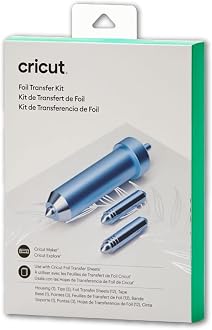
Cricut Foil Transfer Kit (Maker / Explore)
Best Overall
Pressure-activated — no heat, no laminator needed
3-in-1 tool with fine, medium, and bold tips plus 12 starter sheets
Design Space prompts walk beginners through every step
Who it’s for: Maker/Explore owners who want foiled cards and invites with no extra machine to buy or store.
Check current price on Amazon — we don’t hardcode prices.
Quick buying tip
If your budget allows only two purchases, buy the tool that matches your machine plus the sheets made for that tool — Cricut sheets for the Cricut tool, Deco Foil plus adhesive for the Minc. Mixing brands is the number-one beginner foil mistake, and it is the most expensive one.
What you can make
Foiled cards, invitations, and tags — the projects these supplies unlock.
Frequently asked questions
Should I get the Cricut Foil Transfer Tool or a Minc machine?
They serve different workflows. The Cricut Foil Transfer Tool is pressure-activated with no heat: your Maker or Explore draws the design and presses foil onto cardstock, guided by Design Space. The Minc is a heated laminator-style machine that bonds foil to laser-printer toner designs. Pick the Cricut tool for machine-drawn designs; pick the Minc if you want to foil things you print from a laser printer.
Can I use Deco Foil sheets with the Cricut Foil Transfer Tool?
No. Deco Foil packaging states it is not a replacement for Cricut Foil Transfer Sheets. The Cricut tool is pressure-activated and needs Cricut's own sheets; Deco Foil sheets are heat-reactive and designed for the Minc or a laminator with Deco Foil adhesives. Mixing brands is the most common beginner foil mistake.
Do I need a laminator to start foiling?
Not necessarily. The Cricut Foil Transfer Tool works by pressure with no heat at all, and the Foil Quill is a USB-powered heated pen. You only need a laminator-style machine like the Minc when you want to foil laser-printed toner designs, or when using Deco Foil with heat-activated adhesives.
Does foil show up well on dark cardstock?
Yes — metallic foil on dark cardstock is the classic high-contrast look behind most wedding invitations and holiday cards. Gold and silver foil read beautifully on navy, black, and deep jewel tones, which is why dark cardstock and foil are so often paired.
What is the cheapest way to try foiling as a beginner?
If you already own a Maker or Explore, the Cricut Foil Transfer Kit is the lowest-cost entry: one purchase, no extra machine, and the kit includes starter sheets. The Foil Quill starter kit is the flexible alternative since its adapters fit most cutting machine brands, not just Cricut.
What is the difference between the Foil Quill and the Cricut Foil Transfer Tool?
The Foil Quill is a heated pen powered by USB that you mount in your machine with brand adapters; heat melts the foil onto the design. The Cricut Foil Transfer Tool is pressure-based with no heat and is driven by Design Space prompts. Both draw foiled designs, but heat versus pressure is the core difference, along with the Foil Quill working across machine brands.